Zeus Backup
Block-level incremental backup for the Amiga
Version 1.1 - Download - Register
Zeus Backup takes image backups of your Amiga's volumes, block by block, to a
Linux server on your network or to a second disk in the same Amiga. A small
program, ZBTrack, notes every write to the volumes it tracks, so a daily backup
reads and sends only the blocks that changed: usually seconds, even for a large
volume.
It works below the filesystem, so FFS, PFS3 and SFS are handled alike, and
every backup is a complete image that can be restored on its own.
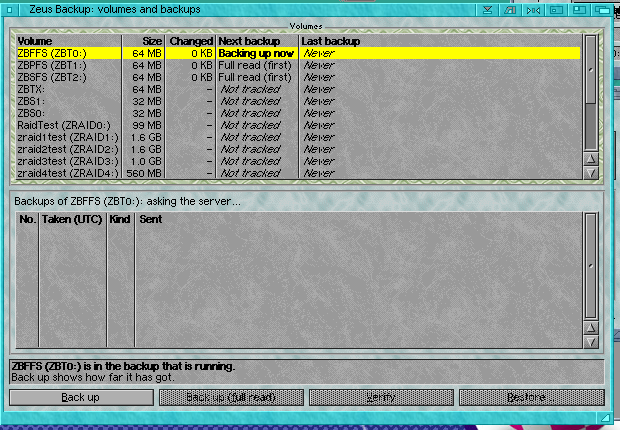
Volumes and backups: a backup running, the next volumes waiting their turn
 Backing up
- Changed Block Tracking: only what changed since the last backup is read and sent
- Consistent live snapshots: writes are held for a moment (typically 20 ms) while the last blocks are read, so a volume in use, such as a running BBS, is backed up safely
- Each block is stored once, however many backups or Amigas contain it
- No server? Keep the backups on a second disk in the same Amiga instead
- A stopped or cut-off backup carries on where it left off, and network failures are retried by themselves
Restoring
- Restore a volume in place or onto another drive: only the blocks that differ are fetched, then every block is checked
- Check a backup against a volume, changing nothing
- Rescue a failing disk: back up everything that can still be read
When the Amiga itself has failed
- The Linux server keeps each disk's partition table as well as its partitions
- Rebuild the whole disk from its backups straight onto a new disk or CF card, ready to put back in the Amiga
- Or write it out as an image that boots in WinUAE or FS-UAE, or export any single backup as an .hdf
- A step-by-step rescue manual, RESCUE.txt, sits beside the server, for when there is no Amiga to read the guide on
Window and Shell
- A MUI window: back up now, restore, check, every volume and its backups, settings, and a progress window you can send to the background
- The ZeusBackup Shell command for scripts and schedulers
- An AmigaGuide manual
Requirements
- AmigaOS 3.0 or newer, 68020 or better
- A TCP/IP stack, for a server
- MUI for the window (optional: the Shell command works without it)
- For a server: a Linux machine, or anything with Python 3.8 or later. No extra packages are needed
Tested for real
Zeus Backup was tested through hundreds of cycles on FFS, PFS3 and SFS volumes,
with every restore checked by reading every file. On 10th November 2026 it put
back the 25GB Mail volume of a live Zeus BBS after a disk fault, fetching only
the 33MB that differed. Zeus Backup is supplied without warranty of any kind;
see the Licence and Assurance pages of its guide.
Shareware
Zeus Backup is shareware. Try it free for 30 days with nothing disabled; if you
keep using it, please register for
£100.
Zeus Bulletin Board System © Zeus Developments
